


Unlock your full trading potential with the IC Markets MetaTrader 5 platform. This comprehensive guide explores every facet of this next-gen platform, from its advanced features to step-by-step instructions for getting started. We designed this resource to show you why combining the power of the MT5 platform with IC Markets’ superior trading conditions creates an unmatched experience. Prepare to elevate your trading game. Join us and discover how to harness this powerful tool for your market analysis and execution.
- What is IC Markets MetaTrader 5?
- Key Features and Benefits of the MT5 Platform
- Advanced Charting Tools and Technical Indicators
- Superior Order Execution with Market Depth (DOM)
- Integrated Economic Calendar for Fundamental Analysis
- IC Markets MT5 vs. MT4: A Detailed Comparison
- How to Download and Install IC Markets MetaTrader 5
- Installation Guide for Windows & Mac
- Setting Up on iOS and Android Devices
- Account Types Available for MetaTrader 5 Users
- Tradable Instruments on the MT5 Platform
- Placing Your First Trade: A Step-by-Step Guide
- Automated Trading with Expert Advisors (EAs)
- Understanding Spreads and Commissions on IC Markets MT5
- Funding and Withdrawing From Your MT5 Account
- Leveraging Virtual Private Server (VPS) for Trading
- Pros and Cons of Using MT5 with IC Markets
- Why Choose IC Markets for Your MetaTrader 5 Experience?
- Frequently Asked Questions
What is IC Markets MetaTrader 5?
IC Markets MetaTrader 5 is a state-of-the-art, multi-asset trading platform designed for active traders who demand performance and flexibility. It is the successor to the legendary MetaTrader 4, rebuilt from the ground up to offer greater capabilities. Think of it as your command center for the financial markets. Through this single interface, you can trade a vast range of instruments, conduct sophisticated technical analysis, and even deploy automated trading strategies. When connected to IC Markets’ deep liquidity and raw pricing environment, the MT5 platform operates at its peak, delivering ultra-fast execution and transparent trading conditions.

Key Features and Benefits of the MT5 Platform
The MetaTrader 5 platform is packed with tools that give you a distinct edge in the markets. It’s more than just an update; it’s a complete evolution in MT5 trading. You gain access to a powerful suite of features designed to enhance your analytical and trading capabilities. Here are some of the standout benefits:
- True Multi-Asset Trading: Go beyond Forex and trade Stocks, Indices, and Commodities all from one platform.
- More Analytical Objects: Utilize a wider array of graphical tools to chart any market with precision.
- Additional Timeframes: Analyze price action across 21 different timeframes, from one-minute to one-month.
- Built-in Economic Calendar: Stay ahead of market-moving news without ever leaving your trading terminal.
- Advanced MQL5 Language: Develop, test, and run more sophisticated Expert Advisors and custom indicators.
- Hedging Allowed: Open multiple positions on the same instrument, both long and short, for maximum strategic flexibility.
Advanced Charting Tools and Technical Indicators
Dive deeper into market analysis than ever before. The IC Markets MetaTrader 5 platform equips you with a formidable arsenal of analytical instruments. You get 38 built-in technical indicators, including classic trend indicators, oscillators, and volume tools. But it doesn’t stop there. The platform also features 44 graphical objects, such as Fibonacci retracements, Gann tools, and Elliott waves, allowing you to perform comprehensive technical studies directly on the charts. This advanced charting package empowers you to identify trends, spot patterns, and make more informed trading decisions with professional-grade precision.
Superior Order Execution with Market Depth (DOM)
Gain unparalleled transparency into market liquidity. The Market Depth (DOM) feature on the MT5 platform is a game-changer for serious traders. It displays the full range of buy and sell orders for an instrument at the current best prices. This insight allows you to accurately gauge market sentiment and liquidity before you place a trade. With one-click trading directly from the DOM window, you can execute orders with incredible speed and precision, making it an essential tool for scalpers and short-term traders looking to capitalize on small price movements.
Integrated Economic Calendar for Fundamental Analysis
Never get caught off guard by a major news event again. The MetaTrader 5 platform features a fully integrated, real-time Economic Calendar right inside your terminal. This powerful tool provides crucial information on upcoming macroeconomic events, central bank announcements, and other market-moving news releases from around the world. You can view event importance, historical data, and consensus forecasts without switching screens or using third-party websites. This seamless integration ensures your fundamental analysis is always in sync with your technical charting, streamlining your entire trading workflow.
IC Markets MT5 vs. MT4: A Detailed Comparison
Choosing the right platform is crucial for your trading success. While MetaTrader 4 remains incredibly popular, MetaTrader 5 offers significant upgrades for the modern trader. Understanding the key differences helps you select the tool that best fits your strategy. We have broken down the core distinctions in this clear comparison.
| Feature | MetaTrader 4 (MT4) | MetaTrader 5 (MT5) |
|---|---|---|
| Best For | Forex Trading | Forex, Stocks, Indices, Commodities |
| Programming Language | MQL4 | MQL5 (More advanced & faster) |
| Pending Order Types | 4 | 6 (Includes Buy Stop Limit & Sell Stop Limit) |
| Technical Indicators | 30 | 38 |
| Timeframes | 9 | 21 |
| Economic Calendar | No | Yes, built-in |
| Market Depth | Basic | Advanced (Level II Pricing) |
How to Download and Install IC Markets MetaTrader 5
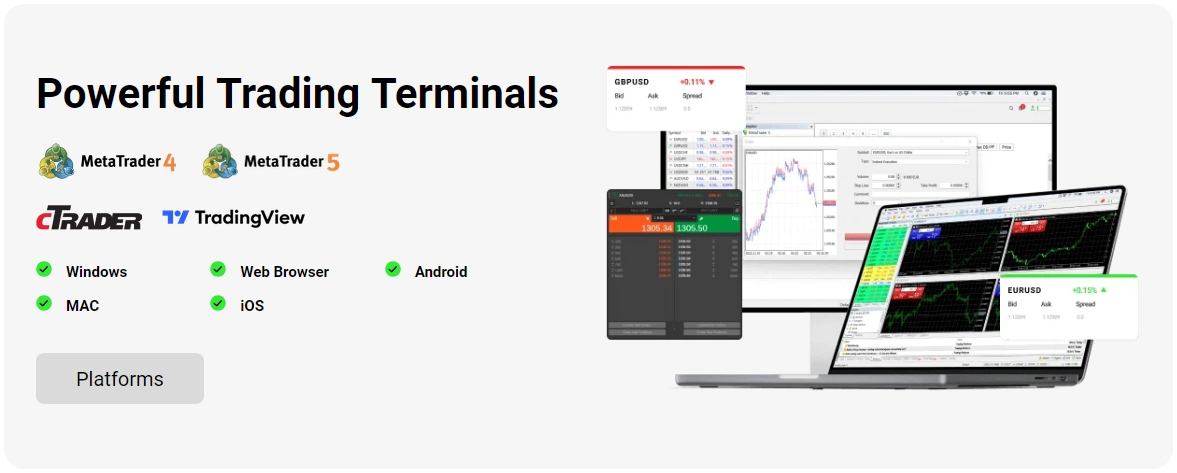
Getting started with the IC Markets MetaTrader 5 platform is a straightforward process. We provide dedicated versions for all major operating systems, ensuring you can trade from your desk or on the move. Whether you use a Windows PC, a Mac, or a mobile device, a powerful trading terminal is just a few clicks away. Follow our simple guides below to install the platform and connect to the markets in minutes.
Installation Guide for Windows & Mac
Setting up the desktop version of MT5 provides the most comprehensive trading experience with full access to all features. The process is simple and quick.
- Navigate to the IC Markets website and find the Trading Platforms section.
- Select the MetaTrader 5 download link for your operating system (Windows or Mac).
- Once the download is complete, open the installer file.
- Follow the on-screen instructions to complete the installation. The platform will typically launch automatically.
- When prompted, select the correct IC Markets server and enter your trading account login and password.
Setting Up on iOS and Android Devices
Trade anywhere, anytime with the powerful MT5 mobile app. You get access to interactive charts, a full set of orders, and popular analytical tools, all in the palm of your hand.
- Open the Apple App Store (for iOS) or Google Play Store (for Android) on your device.
- Search for “MetaTrader 5” and download the official app from MetaQuotes Software Corp.
- Once installed, open the app and tap on “New Account”.
- Choose “Login to an existing account” and type “ICMarketsSC” in the server search bar.
- Select your live or demo server and enter your account credentials to log in.
Account Types Available for MetaTrader 5 Users
At IC Markets, we believe in offering choices that match your trading style. Both our popular Raw Spread and Standard account types are fully compatible with the MetaTrader 5 platform, giving you the flexibility to choose the pricing model that works best for you. Each account provides access to our institutional-grade liquidity and fast execution.
Raw Spread Account: Perfect for scalpers and algorithmic traders. This account features ultra-low spreads starting from 0.0 pips, paired with a small, fixed commission per lot traded. It offers maximum transparency and cost-effectiveness for high-volume traders.
Standard Account: Ideal for discretionary traders who prefer simplicity. This account has no commissions. Instead, all trading costs are included in the spread, which remains highly competitive. It’s a straightforward, all-in-one solution.
Tradable Instruments on the MT5 Platform
The IC Markets MetaTrader 5 platform unlocks access to a massive range of global markets. As a true multi-asset platform, it allows you to diversify your trading strategies across different asset classes, all from a single account. This centralization simplifies your trading and opens up new opportunities for hedging and speculation. Explore our extensive product offering:
- Forex: Trade over 60 currency pairs, including majors, minors, and exotics, with raw pricing.
- Indices: Access major global stock indices from Asia, Europe, and the Americas with no commissions.
- Commodities: Speculate on the price of energy products like WTI Oil and Natural Gas, as well as precious metals like Gold and Silver.
- Stocks: Trade CFDs on hundreds of top stocks from the ASX, NYSE, and NASDAQ exchanges.
- Bonds: Diversify your portfolio with government bonds from around the world.
- Cryptocurrencies: Trade popular digital currencies like Bitcoin and Ethereum against major fiat currencies.
- Futures: Gain exposure to key futures markets, including the ICE Dollar Index and CBOE VIX Index.
Placing Your First Trade: A Step-by-Step Guide
Executing your first trade on the IC Markets MT5 platform is an exciting and simple process. The user-friendly interface makes it easy for new traders to get started. Follow these steps to open your position and enter the market.
- Find Your Instrument: In the “Market Watch” window on the left, locate the asset you wish to trade. If it’s not visible, right-click within the window, select “Symbols,” and enable it.
- Open the Order Window: Double-click on the instrument name, or right-click and select “New Order.” This will open the main order ticket.
- Set Your Volume: In the “Volume” field, enter your desired trade size in lots. This determines the value of your position.
- Manage Your Risk: It is highly recommended to set a “Stop Loss” (to limit potential losses) and a “Take Profit” (to secure profits at a target price).
- Choose an Order Type: For an immediate trade, select “Market Execution.” Alternatively, choose “Pending Order” to set an entry price for the future.
- Execute the Trade: Click the “Sell by Market” or “Buy by Market” button to place your trade. Your position will now appear in the “Trade” tab of the Terminal window.
Automated Trading with Expert Advisors (EAs)
Unleash the full power of the MetaTrader 5 platform with automated trading. Expert Advisors (EAs) are programs that run directly on your terminal, allowing you to automate your trading strategies 24 hours a day. EAs can monitor markets, identify opportunities, and execute trades based on pre-defined rules, removing emotion and human error from your trading.
The MT5 platform uses the advanced MQL5 programming language, which is more powerful and efficient than its predecessor. This allows for the creation of more complex and faster EAs. You can develop your own robot, purchase one from the vast MetaTrader Market, or even download one for free. Combined with IC Markets’ low-latency execution, MT5 provides the ideal environment for your EAs to perform at their best.
Understanding Spreads and Commissions on IC Markets MT5
Transparency is key to our trading environment. It’s crucial to understand the two main costs associated with trading: the spread and the commission. At IC Markets, we provide clear pricing models tailored to different trading styles, all accessible on the MetaTrader 5 platform.
- The Spread: This is the small difference between the buy (ask) and sell (bid) price of an instrument. We source our pricing from a deep pool of liquidity providers, which allows us to offer some of the tightest spreads in the industry, starting from 0.0 pips.
- The Commission: This is a fixed fee charged for opening and closing a trade. Our Raw Spread account uses this model, combining a small commission with ultra-thin spreads. Our Standard account, on the other hand, has zero commission, with the cost built into a slightly wider spread.
By choosing the account type that suits your MT5 trading strategy, you can optimize your costs and maximize your potential returns.
Funding and Withdrawing From Your MT5 Account
Managing your funds with IC Markets is a secure and streamlined process. While you execute trades on the MetaTrader 5 platform, all account funding and withdrawals are handled through our secure Client Area. This separation ensures the highest level of security for your financial information.
We offer a wide range of convenient and fast payment options to suit your needs:
- Credit & Debit Cards (Visa, Mastercard)
- PayPal
- Neteller & Skrill
- Bank Wire Transfer
- And many more regional options.
We pride ourselves on rapid processing times, with most deposits being instant and withdrawals processed promptly to get your funds to you quickly. There are no fees on deposits or withdrawals from our side.
Leveraging Virtual Private Server (VPS) for Trading
Ensure your trading strategies run uninterrupted 24/7. A Virtual Private Server (VPS) is a remote server that hosts your MetaTrader 5 platform, keeping it online and connected to our trade servers even when your personal computer is turned off. This is an essential tool for traders who rely on Expert Advisors (EAs) for automated trading.
Using a VPS with IC Markets offers significant advantages:
- Constant Uptime: Protects your EAs from power outages, internet disruptions, and computer crashes.
- Lower Latency: Our VPS providers are co-located in the same data centers as our trade servers (New York & London), drastically reducing trade execution time.
- Enhanced Security: Your trading environment is hosted on a secure, professionally managed server.
Eligible clients can even qualify for a free VPS subscription, making professional-grade automated MT5 trading more accessible than ever.
Pros and Cons of Using MT5 with IC Markets
To make an informed decision, it’s important to look at both sides. The combination of the MetaTrader 5 platform and the IC Markets trading environment is incredibly powerful, but it’s helpful to understand its complete profile.
| Pros | Cons |
|---|---|
| Access to a wider range of markets including stocks and futures. | The MQL5 programming language has a steeper learning curve than MQL4. |
| Superior analytical tools with more indicators and timeframes. | Fewer third-party EAs and indicators available compared to the vast MT4 library. |
| Ultra-fast execution through IC Markets’ low-latency infrastructure. | The interface can feel complex for absolute beginners compared to simpler web platforms. |
| Advanced order types and Market Depth for precise trading. | Hedging is not permitted for clients under certain regional regulations. |
| Integrated economic calendar and other built-in tools. |
Why Choose IC Markets for Your MetaTrader 5 Experience?
A great platform is only as good as the broker powering it. When you use the MetaTrader 5 platform with IC Markets, you are unlocking its full potential. We have created a trading environment designed for performance, providing the ideal conditions for both discretionary and algorithmic traders.
“Combining the feature-rich MT5 platform with IC Markets’ Raw Pricing and lightning-fast execution creates an institutional-grade trading experience accessible to everyone.”
Here’s what makes our offering stand out:
- Raw Spreads: We connect you directly to our deep liquidity pool, offering some of the tightest possible spreads in the market.
- Fast Execution: Our enterprise-grade hardware and server co-location in New York and London ensure your orders are filled with minimal latency.
- No Restrictions: We allow all trading styles, including scalping, hedging, and automated trading with EAs.
- Unmatched Instrument Range: Trade a vast selection of CFDs across Forex, Indices, Commodities, Stocks, and more.
- Award-Winning Support: Our dedicated support team is available 24/7 to assist you with any platform or account-related queries.
Join IC Markets and experience the next-gen MT5 platform the way it was meant to be.
Frequently Asked Questions
What is the main difference between MT4 and MT5 on IC Markets?
The main difference is that MT5 is a true multi-asset platform, allowing you to trade Forex, Stocks, Indices, and Commodities, whereas MT4 is primarily focused on Forex. MT5 also offers more advanced tools, including 21 timeframes (vs. 9 in MT4), 38 technical indicators (vs. 30), and a built-in Economic Calendar.
What account types can I use with MetaTrader 5 at IC Markets?
You can use both the Raw Spread and Standard account types with MT5. The Raw Spread account is designed for scalpers and algorithmic traders, featuring ultra-low spreads from 0.0 pips and a small commission. The Standard account is commission-free, with all costs included in the competitive spread, making it ideal for discretionary traders.
Can I automate my trading on the IC Markets MT5 platform?
Yes, the MT5 platform fully supports automated trading through Expert Advisors (EAs). It uses the advanced MQL5 programming language, which allows for the creation of more complex and faster trading robots compared to MT4. You can develop your own EAs, buy them from the MetaTrader Market, or use free ones.
How can I trade on the go with IC Markets MT5?
You can trade from anywhere by downloading the MetaTrader 5 mobile app, which is available for both iOS and Android devices. After installing the app from the App Store or Google Play Store, simply log in to your existing IC Markets account to access interactive charts, a full set of orders, and analysis tools on your mobile device.
What instruments can I trade on the MT5 platform with IC Markets?
The MT5 platform at IC Markets gives you access to a wide range of global markets. You can trade over 60 Forex pairs, major global indices, commodities like oil and gold, CFDs on hundreds of stocks from exchanges like NYSE and NASDAQ, government bonds, popular cryptocurrencies, and various futures.