


Ready to elevate your trading experience beyond the basics? The standard MetaTrader 4 platform is powerful, but with the IC Markets MT4 Advanced Trading Tools, you can transform it into a professional-grade trading powerhouse. This exclusive suite of over 20 trading add-ons gives you a definitive edge for faster execution, deeper analysis, and smarter risk management. Stop trading with limitations and discover the advanced tools that professionals use to gain an advantage. Unlock a new level of control and precision in the financial markets today.
- What Exactly Are the IC Markets Advanced Trading Tools?
- How to Download and Install the MT4 Advanced Tools Pack
- System Requirements and Compatibility Check
- A Step-by-Step Installation Guide
- Mastering Trade Execution with the Mini Terminal
- The Trade Terminal: Your Central Command for All Orders
- Gaining an Edge with Sophisticated Analytics Tools
- Using the Correlation Matrix to Uncover Market Relationships
- Gauging Market Mood with the Sentiment Trader
- The Alarm Manager: Never Miss a Critical Market Event
- Executing Discreetly with Stealth Orders
- The Market Manager: A Complete Overview of Your Watchlist
- Exploring the Tick Chart Trader for Precision Entries
- Visualizing Global Market Hours with the Session Map
- Leveraging Advanced Order Types Not Found in Standard MT4
- Top Benefits of Using IC Markets’ Enhanced Toolset
- Boosting Trading Efficiency and Speed
- Improving Your Risk Management Strategies
- Are These Advanced Tools Suitable for Beginner Traders?
- Standard MT4 vs. IC Markets Enhanced MT4: A Comparison
- Frequently Asked Questions
What Exactly Are the IC Markets Advanced Trading Tools?
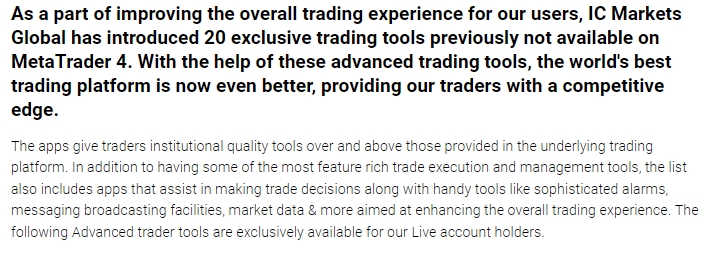
Think of them as a professional upgrade for your MetaTrader 4 platform. The IC Markets Advanced Trading Tools are a comprehensive package of expert advisors and custom indicators designed to solve real-world trading challenges. This is not just a handful of simple MT4 indicators; it’s a fully integrated suite that enhances every aspect of your trading.
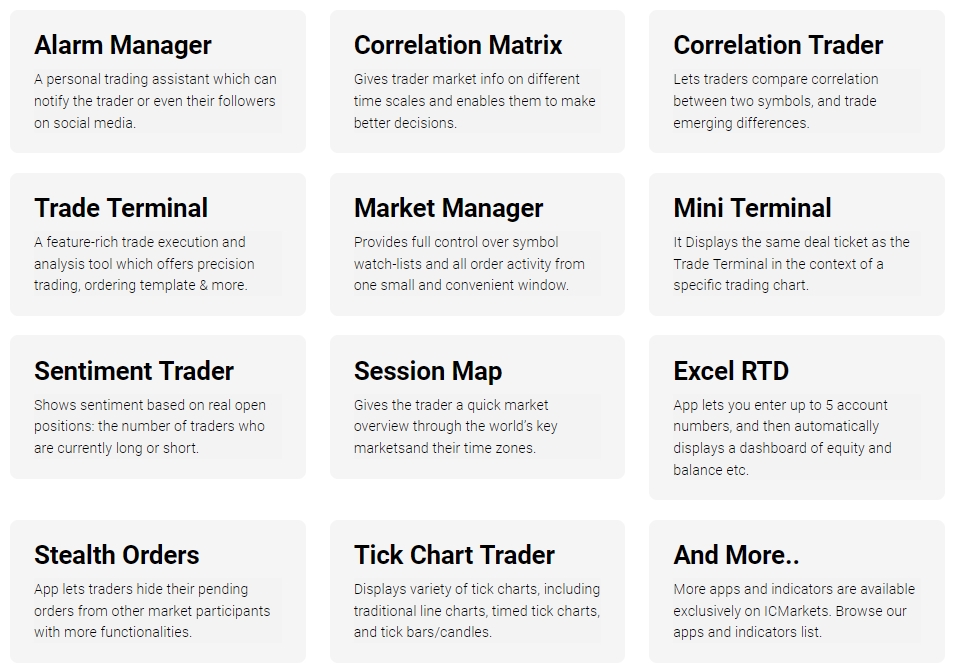
- Trade Execution & Management: Powerful terminals for one-click trading, bulk order management, and advanced order types.
- Market Analysis: Sophisticated tools to analyze market sentiment, correlation, and tick-by-tick price action.
- Alerts & Notifications: A highly customizable alarm system that keeps you informed about every critical market event.
- Utility & Interface Enhancements: Widgets like a session map and market manager that streamline your workflow and provide vital information at a glance.
These professional trading add-ons are available exclusively to IC Markets live account holders, providing a superior trading environment that goes far beyond the default MT4 setup.
How to Download and Install the MT4 Advanced Tools Pack
Gaining access to this powerful suite of MT4 tools is a simple and straightforward process for all IC Markets clients. We’ve designed the installation to be as smooth as possible, getting you from download to trading in just a few minutes. Follow the clear steps below to integrate these game-changing features directly into your trading platform and start leveraging their power immediately.
System Requirements and Compatibility Check
Before you begin, ensure your system is ready. The MT4 Advanced Trading Tools are designed for maximum performance and stability, but a quick compatibility check guarantees a seamless experience.
- Operating System: Microsoft Windows 7, 8, or 10.
- Trading Platform: An authentic installation of the IC Markets MetaTrader 4 platform. The tools will not work on platforms from other brokers.
- Account: You must have a live trading account with IC Markets to download and activate the tools.
Please note: For Mac users, the tools can be run using a Windows virtual machine or parallel desktop solution.
A Step-by-Step Installation Guide
Ready to install? Follow these simple steps to add the advanced tools to your MT4 terminal.
- Download the Installer: Log in to your IC Markets Secure Client Area and navigate to the Downloads section to find the Advanced Trading Tools installer.
- Close MetaTrader 4: Before running the installer, make sure all instances of your MT4 platform are completely closed.
- Run the Installation File: Double-click the downloaded file to launch the installation wizard.
- Select Your MT4 Instance: The installer will automatically detect your IC Markets MT4 installations. Select the one(s) you wish to upgrade and click “Install.”
- Restart MT4: Once the installation is complete, open your MT4 platform.
- Enable Expert Advisors: In the top menu, go to “Tools” -> “Options” -> “Expert Advisors” and tick “Allow automated trading” and “Allow DLL imports.”
- Find Your New Tools: You will now find all the new MT4 indicators and expert advisors in the “Navigator” panel on the left side of your platform. Drag any tool onto a chart to begin using it.
Mastering Trade Execution with the Mini Terminal
The Mini Terminal is a game-changer for active traders. This nimble yet powerful tool attaches to any single chart, giving you lightning-fast control over your trades for that specific instrument. Forget fumbling with the standard order window. The Mini Terminal allows you to execute trades with a single click, set stop-loss and take-profit levels visually, and calculate your position size automatically based on your risk parameters. It is the ultimate tool for scalpers and day traders who demand speed and precision.

The Trade Terminal: Your Central Command for All Orders
If the Mini Terminal is a scalpel, the Trade Terminal is the entire surgical suite. This powerful window provides a comprehensive overview and control center for your entire trading account. Instead of managing trades chart-by-chart, the Trade Terminal lets you manage all open positions and pending orders from one convenient location. Key features include:
- Viewing a summary of your account metrics (equity, margin, profit).
- Closing all open positions with a single click.
- Creating templates for complex order types to deploy instantly.
- Setting up automated closing rules based on profit or loss criteria.
It’s the most efficient way to manage a diverse portfolio of trades simultaneously.
Gaining an Edge with Sophisticated Analytics Tools
Go beyond the standard moving averages and oscillators. The advanced MT4 package includes a range of sophisticated analytical tools designed to give you a deeper understanding of market dynamics. These are not your average MT4 indicators. They provide insights into market relationships and crowd behavior that are simply unavailable in the standard platform. By using these tools, you can identify opportunities that other traders miss and make more informed decisions based on a richer data set.
Using the Correlation Matrix to Uncover Market Relationships
The Correlation Matrix is an essential tool for understanding how different markets move together. It provides a clear, color-coded grid that shows the correlation between various trading instruments in your watchlist. A strong positive correlation means two pairs tend to move in the same direction, while a strong negative correlation means they move in opposite directions. You can use this vital information to:
- Avoid over-exposure by trading multiple pairs that move in lock-step.
- Identify potential hedging opportunities.
- Discover new trading ideas based on correlated or diverging assets.
Gauging Market Mood with the Sentiment Trader
Ever wondered what other traders are doing? The Sentiment Trader tool gives you a direct view into market positioning. It displays aggregated live client sentiment data, showing the percentage of traders who are currently long versus short on a specific instrument. This powerful data can be used in several ways:
- As a contrarian indicator, looking for opportunities when sentiment reaches an extreme.
- As a confirmation tool to validate your own trade ideas.
- To understand the current “mood” of the market for a particular currency pair or commodity.
The Alarm Manager: Never Miss a Critical Market Event
The Alarm Manager is your personal trading assistant, working 24/7 to keep you informed. This is far more powerful than a simple price alert. You can set up complex, multi-condition alarms for a huge range of events. Imagine getting an alert on your phone or via email when your account margin level drops, when a specific news event is released, or when a trade hits 50% of its take-profit target. This tool ensures you are always aware of what matters most, even when you are away from your charts. It’s an indispensable feature for any serious trader.
Executing Discreetly with Stealth Orders
Stealth Orders provide a crucial advantage in volatile markets. This feature allows you to place stop-loss and take-profit orders that are hidden from the market and the broker’s servers. Instead of sitting on the server, the orders are held within your MT4 platform and are only executed as market orders when your entry price is hit. This means your exit points are invisible to the public order book, which can be a significant benefit for traders concerned about stop-hunting or wanting to execute large orders without revealing their strategy.
The Market Manager: A Complete Overview of Your Watchlist
The Market Manager streamlines your entire trading workspace. It condenses all the vital information from your “Market Watch” window into a single, compact, and highly functional panel. From this one window, you can view real-time price information, spreads, and daily price changes for all your favorite instruments. More importantly, you can manage your positions and place new orders directly from the Market Manager without needing to switch between different charts. It’s the ultimate tool for keeping a finger on the pulse of the market and managing your watchlist efficiently.
Exploring the Tick Chart Trader for Precision Entries
For traders who operate on the smallest timeframes, the Tick Chart Trader is an essential tool. Standard MT4 charts are time-based, meaning a new candle forms after a set period. Tick charts are different; a new candle forms after a set number of trades (ticks) have occurred. This provides a much clearer view of market activity and volatility. The Tick Chart Trader allows you to:
- View fast-moving tick charts for any instrument.
- Place ultra-fast market and pending orders with a single mouse click.
- Execute scalping strategies with the highest level of precision.
Visualizing Global Market Hours with the Session Map
The financial markets operate around the clock, but not all hours are created equal. The Session Map provides a simple, visual guide to global market hours. It shows you which major financial centers—Sydney, Tokyo, London, and New York—are currently open for business. The map also highlights upcoming session opens and closes, as well as key news events scheduled for the day. This helps you instantly identify periods of high liquidity and volatility, allowing you to tailor your strategy to the most active trading times.
Leveraging Advanced Order Types Not Found in Standard MT4
Break free from the limitations of standard “market” and “pending” orders. The IC Markets advanced MT4 tools, particularly the Mini Terminal, unlock a world of sophisticated order functionality. This gives you far greater control over how you enter and exit the market.
Empower your trading strategy with institutional-grade order control. Place orders that execute exactly how you want, when you want.
Some of the powerful order types you can access include:
- One-Cancels-Other (OCO) Orders: Place two pending orders (e.g., a buy stop and a sell stop for a breakout). When one is triggered, the other is automatically cancelled.
- Partial Closing: Close a percentage of your trade at different profit levels to lock in gains while letting the rest run.
- Time-Based Stops: Automatically close a trade after a set amount of time has passed.
- Stealth Orders: Hidden stop-loss and take-profit orders that are invisible to the market.
Top Benefits of Using IC Markets’ Enhanced Toolset
Integrating these advanced MT4 tools into your daily routine offers tangible benefits that can directly impact your trading performance. This isn’t just about adding more charts and lines; it’s about fundamentally improving how you interact with the market. By providing you with greater speed, deeper insight, and more robust control, this toolset empowers you to trade more effectively and manage risk with professional precision.
Boosting Trading Efficiency and Speed
In trading, every second counts. The IC Markets toolset is built for speed. Features like one-click trading from the Mini Terminal and Tick Chart Trader eliminate delays in execution. The Trade Terminal allows you to manage dozens of positions simultaneously, an impossible task on the standard platform. By creating order templates and automated rules, you spend less time on manual administration and more time analyzing the market and finding your next opportunity.
Improving Your Risk Management Strategies
Effective risk management is the cornerstone of successful trading. Our advanced tools provide superior risk control. The integrated position size calculator in the Mini Terminal ensures you never risk more than you intend to on a single trade. Advanced stop-loss functionality, such as multi-level stops or moving stops to break-even automatically, helps protect your capital dynamically. Furthermore, Stealth Orders offer an additional layer of protection for your exit points.
Are These Advanced Tools Suitable for Beginner Traders?
Absolutely. While the suite is powerful enough for seasoned professionals, many of the tools are incredibly valuable for those new to trading. We encourage beginners to start with the more intuitive tools to build a solid foundation.
For example, a new trader can greatly benefit from:
- The Session Map to understand when the market is most active.
- The Alarm Manager to set simple alerts for price levels without having to watch the screen all day.
- The Mini Terminal’s risk calculator to learn proper position sizing from day one.
As your knowledge and confidence grow, you can progressively integrate more sophisticated features like the Correlation Matrix and advanced order types. The toolset is designed to grow with you on your trading journey.
Standard MT4 vs. IC Markets Enhanced MT4: A Comparison
See for yourself how the IC Markets enhanced MT4 platform stacks up against the standard version. The difference is clear: our advanced trading add-ons provide a demonstrably superior experience across every key area of trading.
| Feature | Standard MT4 | IC Markets Enhanced MT4 |
|---|---|---|
| Trade Execution | Standard order window | One-click trading, bulk management, trade from chart |
| Order Types | Basic market & pending orders | OCO, partial closes, stealth orders, time-based stops |
| Market Analysis | Default indicators only | Correlation Matrix, Sentiment Trader, Session Map, Tick Charts |
| Alerts | Basic price level alerts | Advanced alerts for news, account metrics, technical events |
| Risk Management | Manual stop/loss placement | Integrated position size calculator, advanced stop-loss types |
Frequently Asked Questions
Are the IC Markets MT4 Advanced Trading Tools free?
Yes, the entire suite of over 20 professional trading tools is provided completely free of charge to all clients who have a live trading account with IC Markets.
What are the system requirements for these tools?
The tools require a Microsoft Windows operating system (7, 8, or 10) and an authentic installation of the IC Markets MetaTrader 4 platform. They are not compatible with platforms from other brokers.
Can I use these advanced tools on a demo account?
No, the Advanced Trading Tools are an exclusive benefit for live account holders. You must open and fund a live trading account with IC Markets to gain access.
What are some of the key features included in the tools pack?
The pack includes a wide range of enhancements such as the Mini Terminal for fast order execution, the Correlation Matrix to analyze market relationships, the Sentiment Trader to gauge market mood, and Stealth Orders for discreet trading.
How do Stealth Orders provide a trading advantage?
Stealth Orders allow you to set stop-loss and take-profit levels that are hidden from the market and the broker’s servers. The orders are held on your local platform, making your exit points invisible, which can help prevent issues like stop-hunting.